From meeting notes to a clearer structure
Turn raw meeting notes into a mind map you can act on
When notes are long, repetitive, or hard to scan, a visual map is often easier to use. Paste the notes into StitchGraph, let AI organize the first pass, then tighten the map around decisions, themes, and action items.
Why this works in StitchGraph
StitchGraph gives you a fast path from raw input to a usable visual map, without forcing you to stay inside the AI output.
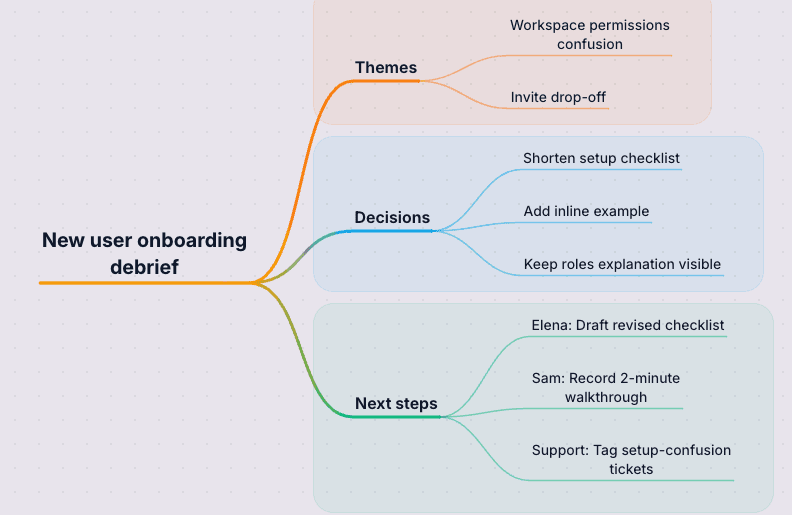
Raw meeting text becomes a visual recap with decisions, actions, and owners separated clearly.
You can tighten the first pass instead of rewriting the whole meeting summary from scratch.
Before
Meeting notes
- New users keep getting stuck on workspace permissions during setup.
- Invite acceptance drops when the checklist asks for too much context too early.
- Decision: shorten the setup checklist and add one inline example before the invite step.
- Decision: keep the workspace roles explanation visible during the first setup run.
- Next steps: Elena drafts the revised checklist, Sam records a 2-minute walkthrough, and support tags setup-confusion tickets.
- Paste text notes, call transcripts, or rough recaps directly into the AI map generator.
- Use hierarchy to separate themes, decisions, blockers, owners, and follow-ups instead of scanning the same recap twice.
- Share a visual summary instead of rewriting the meeting into another long follow-up email.
- Export the result as PDF or Markdown when a stakeholder needs a clean recap fast.
Paste raw notes, call transcripts, or recaps and turn them into something people can scan fast.
Step 1
Paste the notes or transcript excerpt
Drop in the notes, transcript excerpt, or recap while the discussion is still fresh and the context is still obvious.
Step 2
Review the grouped recap
Check how AI grouped themes, decisions, follow-ups, and supporting details into branches before you send the summary around.
Step 3
Tighten the handoff
Rename branches, add missing actions, assign owners, then share or export the map as the meeting recap.
Leave with a recap people can use
Pull themes, decisions, and next steps into a map you can scan, share, and revisit after the meeting.
Turn a transcript into a scan-friendly recap
A mind map surfaces the actual structure of the conversation faster than a long transcript, running bullet list, or copied notes doc.
Separate decisions from open questions
Once the notes are mapped, it becomes easier to isolate decisions, owners, open questions, blockers, and follow-up threads without rereading everything.
Share the recap without rewriting it
Keep the map live for planning, or export it when you need a clean recap for stakeholders, teammates, or the next meeting owner.
Transcript-to-recap structure
Turn long notes, call transcripts, and messy recaps into grouped themes, decisions, owners, and follow-ups.
Cleaner handoff for teammates
Separate decisions from open questions so people can scan the recap without rereading the whole meeting.
Exportable recap formats
Send the summary as a live map, or export it to PNG, PDF, or Markdown when stakeholders need a static recap.
Turn Notes Into a Map
The fastest way to see whether this fits your work is to create a free account and build one real map with your own notes.
Turn Notes Into a MapMeeting recap questions
Find out how rough notes, recurring calls, and shareable recaps fit into the same map.
Can I paste messy notes, or do they need to be cleaned up first?
Messy notes are fine. AI can organize rough text into a clearer map that you can clean up afterward.
Does this work for recurring meetings and interview calls?
Yes. It can help with weekly team syncs, retrospectives, client calls, research interviews, and planning sessions where themes repeat and the recap needs to be easy to scan.
Can I share the recap with people who do not edit the map?
Yes. You can share a link for viewing, or export the map when you need a static recap for teammates or stakeholders.
Keep the recap moving
When the recap needs a stronger map, easier sharing, or a better next step, start here.
Generate a structured mind map from a prompt, outline, or pasted notes.
Move from messy ideation to a usable map for planning and collaboration.
Use AI chat, branch expansion, and descriptions to understand a topic visually.
See how to tighten notes, decisions, and follow-ups before you share the recap.